Correcting The Hype: Twitter’s NFL Stream Lacks Engagement and A Profitable Business Model

nfl-twitterWith two NFL games under Twitter’s belt now, I’m reading far too many headlines hyping what it means for Twitter to be in the live streaming business. Phrases like “game changing,” “milestone,” and “make-or-break moment” have all been used to describe Twitter’s NFL stream. Many commenting about the stream act as if live video is a new kind of new technology breakthrough, with some even suggesting that “soon all NFL games will be broadcast this way.” While many want to talk about the quality of the stream, no one is talking about the user interface experience or the fact that Twitter can’t cover their licensing costs via any advertising model. What Twitter is doing with the NFL games is interesting, but it lacks engagement and is a loss leader for the company. There is nothing “game changing” about it.

The first NFL game on Twitter reached 243,000 simultaneous users and 2.3M total viewers. But looking further at the data, the average viewing time was only 22 minutes. Most who turned into Twitter didn’t stick around. Many like myself tuned into only to see what the game would look like and how Twitter would handle live video within their platform. For week two, Twitter reached 2.2M total viewers and had 347,000 simultaneous users, but the NFL isn’t saying what the average viewing time was. Twitter and the NFL are also counting a viewer as anyone who watched a “minimum of three seconds with that video being 100% in view”, which is a very short metric to be using.

Unfortunately, the whole NFL experience on Twitter was a failure in what Twitter is supposed to be about – engagement. Watching the stream in full screen, on any device, felt like I was watching the game via any other app. Twitter didn’t overlay tweets in any way, some commercial breaks had no ads shown at all and tweets weren’t curated. Far too many tweets added nothing to the game with comments like “Jets Stink.”

Streaming live content on the web has been around for 21 years now, and it’s sad state of the industry when the most exciting part of the event was that people could not believe the video didn’t buffer or have widespread quality issues. It’s not hard to deliver a video stream to 243,000/347,000 simultaneous users, especially when Twitter hired MLBAM, who then used Limelight, Level 3 and Akamai to deliver the stream. Some suggested that the “NFL on Twitter opens an enticing lucrative new revenue stream,” which of course isn’t the case at all. We don’t know for sure what Twitter paid for the NFL games, but if the rumors of $1M per game are right, Twitter can’t make that back on advertising. They don’t have a large enough audience tuning into the stream and would never get a CPM rate to cover their costs. Some have even suggested that the NFL stream on Twitter is a “model for other revenue-generating live stream events.” but of course that’s not the case. One-off live events can’t generate any substantial revenue as the audience size is too small, and the length of the event too short.

There is nothing wrong with Twitter using NFL content to try to attract more users to the service and grow their audience, but the NFL content itself isn’t a revenue generator for the company. Some, including NFL players, suggested that soon all NFL games will be broadcast online and that what Twitter and the NFL are doing is the future. That idea isn’t in touch with reality. The NFL is getting paid $28B from FOX, CBS and NBC over the course of their contracts, which end in 2022. That averages out to $3.1B per year the NFL is getting from just those three broadcasters. The NFL has no financial incentive to put more NFL games online, without restrictions, or they risk losing their big payday from the broadcasters. It’s not about what consumers want, it’s about what’s best for the NFL’s bottom line. Economics drives this business, not technology or platforms.

If Twitter has a game plan for all the live video they are licensing, it’s not clear what that is. In a recent interview with Twitter’s CFO, he commented that Twitter’s goal with the NFL games is to, “help the NFL reach an audience it was not otherwise reaching.” How does Twitter know they are doing that? There were plenty like me who were watching the game on TV and Twitter at the same time. The NFL didn’t need Twitter to reach me. And when the CFO uses the term “high fidelity” to describe the stream, what does that mean? Twitter keeps saying they have the “mobile audience,” but they won’t break out numbers on what the usage was on mobile versus the web, or any data on average viewing time on mobile. Twitter also said, “there was evidence that people who had not watched the NFL in a while were back engaged with it.” Why kind of evidence is that exactly? Twitter can’t tell if I was on NFL.com the day before, or watching the game on TV today, so what kind of data are they referencing?

Twitter also says that they were “incredibly pleased with how easy it was for people to find the Thursday night game on Twitter.” Making a live link available isn’t hard. A WSJ article said there are other “live sports streaming technologies out there” but Twitter’s was “easy to use.” All the live linear video on the web is using the same underlying technology, Twitter isn’t doing anything special. They are using the same platform that MLB, ESPN, PlayStation Vue, WWE and others use, as they are all MLBAM customers. Many in the media made it sound like Twitter did something revolutionary with the video technology, which wasn’t the case at all.

Someone commented online that the reason Twitter’s NFL stream is so “successful” is because “advertisers love the mass that live sports delivers.” But it doesn’t deliver that mass audience online, only on TV. And that’s the rub. The NFL and every other major sports league isn’t going to do anything to mess with their core revenue stream. So for at least the next six years, until their contracts with the broadcasters come up for renewal, the NFL isn’t going to do anything more than experiment with live streaming. And there will always be another Twitter, Yahoo, Verizon, Google, or someone else who wants to give the NFL money, more for the publicity of the deal, than for anything that actually increases their bottom line.

Sponsored by

Moderating NYME Session On Future Of Live Streaming Thursday, Looking For Speaker

nyme-logoThursday at 12:20pm I am moderating a session on “The Future Of Live Streaming: Sports, Linear TV & Social” at the New York Media Festival in NYC. It’s a short 30-minute round table panel, with lots of Q&A from the audience. I am looking for one more speaker to join the panel, preferably a content owner/broadcaster/aggregator etc. Email me if interested.

The Future Of Live Streaming: Sports, Linear TV & Social
From NFL games on Twitter, to upcoming live linear services from Hulu and AT&T joining Sling TV, live streaming is exploding on the web. With rumors of Amazon wanting to license live sports content, Disney’s investment in MLBAM, and Twitch pumping out millions of live streams daily, consumers now have more live content choices than ever before. Attendees of this session will have the opportunity to participate in the discussion about the most important obstacles being faced when it comes to live streaming. Topics to be covered include content licensing costs for premium content, monetization business models, what consumers want to watch and the impact social services could have on live video. This will be an interactive session with plenty of Q&A from the audience. http://mefest.com/session/the-future-of-live-streaming/

How To Implement A QoS Video Strategy: Addressing The Challenges

While the term “quality” has been used in the online video industry for twenty years now, in most cases, the word isn’t defined with any real data and methodology behind it. All content owners are quick to say how good their OTT offering is, but most don’t have any real metrics to know how good or bad it truly is. Some of the big OTT services like Netflix and Amazon have built their own platforms and technology to measure QoS, but the typical OTT provider needs to use a third-party provider.

I’ve spent a lot of time over the past few months looking at solutions from Conviva, NPAW, Touchstream, Hola, Adobe, VMC, Interferex and others. It seems every quarter there is a new QoS vendor entering the market and while choice is good for customers, more choices also means more confusion on the best way to measure quality. I’ve talked to all the vendors and many content owners about QoE and there are a lot of challenges when it comes to implementing a QoS video strategy. Here’s some guidelines OTT providers can follow.

One of the major challenges in deploying QoS is the impact that the collection beacon itself has on the player and the user experience. These scripts can be built by the content owner, but the time and resources it takes to not only build them for their ecosystem of platforms, but develop dashboards, create metrics and analyze the data is highly resource intensive and time consuming. Most choose to go with a third-party vendor who specifically offers this technology, however choosing the right vendor can be another pain point. There are many things to consider when choosing a vendor but in regards to implementation, content owners should look at the efficiency of their proposed integration process (for example, having standardized scripts for the platforms/devices/players you are using and the average time it takes to integrate) and their ability to adapt to your development schedule. [Diane Strutner from Nice People At Work (NPAW) had a good checklist on choosing a QoE solution from one of her presentations, which I have included with permission below.]
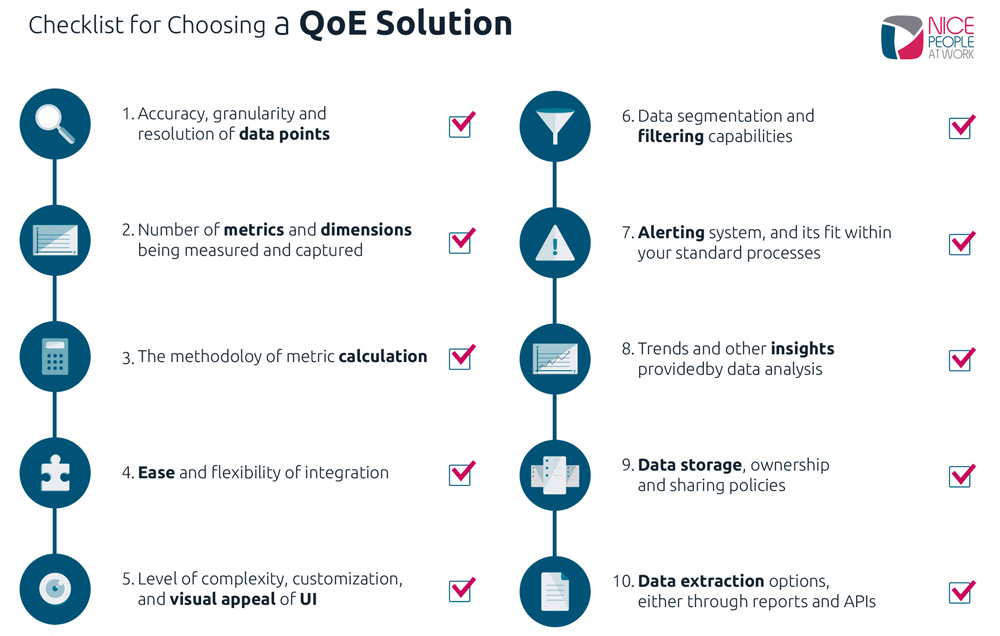
dAnother thing to consider is the technology behind the beacon itself. The heavier the weight of the plug-in the longer the player load time will be. There are two types of beacons, ones that process the data on the client (player-side) which tend to be heavier or the ones that push information back to a server to be processed, which tend to be lighter.

One of the biggest, if not the biggest, challenge to implement QoS is that it forces content owners to accept a harsh reality: that their services do not always work as they should all the time. It can reveal that the CDN, or DRM or ad server or player provider that the content owner is using is not doing their job correctly. So the next logical question to ask is what impact does this have? And the answer is, that you won’t know (you can’t know) until you have the data. You have to gather this data through properly implementing a QoS monitoring, alerting and analysis platform and insights gathered from it and then apply it into your online video strategy.

When it comes to collecting metrics, there are some metrics that matter most to ensure broadcast quality video looks good. The most important are buffer ratio (amount of time in buffer divided by playtime), join time (or time to first frame of the video delivered), and bitrate (the capacity of bits per second that can be delivered over a network). Buffer and join time have elements of the delivery process that can be controlled by the content owner, and others that cannot. For example, are you choosing a CDN who had POPs close to your customer base, had consistent and sufficient throughput to deliver the volume of streams being requested, and peers well with the ISP your customer base is using? Other elements like the bitrate are not something that a content owner can control, but should influence your delivery strategy, particularly when it comes to encoding.

For example, if you are encoding in bitrates that are HD but your user base streams at low bitrates, this will cause quality metrics like buffer ratio and join time to increase. One thing to remember is that you can’t look to just one metric to understand the experience of your user base. Looking at one metric alone can lead to misinformation. These metrics are all interconnected, and you must have the full scope of data in order to get the full picture needed to really understand your QoS and the impact it has on your user experience.

Content owners routinely ask how they can ensure a great QoE when there are so many variables (i.e., user bandwidth, user compute environment, access network congestion, etc.)? They also want to know once they data is collected, what industry benchmarking should they use to compare their data to? The important thing to remember is that such benchmarks can never be seen as anything more than a starting block. If everything you do is “wrong” (streaming from CDNs with POPs half way across the world from your audience base, encoding in only a few bitrates, and other industry mistakes) and your customer base and engagement grow (and earn more on ad serve and/or grow retention) then, who cares? And let’s say you do everything “right” (streaming from CDNs with the best POP map, and encoding in a vast array of bitrates) and yet your customers leave (and the connected subscription and ad serve revenue drops) then, who cares either?

When it comes to QoS metrics, the same logic applies. So what do content owners focus on? The metrics (or combination of them) that are impacting your user base the most. How do content owners identify what these are? They need data to start. For one it could be join time. For their competitor it could be buffer ratio. Do users care that one content owner paid more for CDN, or has a lower buffer ratio that their competitor? Sadly, no. The truth behind what matters to the business of content owners (as it relates what technologies to use, or what metrics to paramount) in their own numbers. And that truth may (will) change as your user base changes, viewing habits and consumption patterns change, and your consumer and vendor technologies evolve. And content owners must have a system that provides continual monitoring to detect these changes at both a high level and granular level.

There has already been widespread adoption for online video, but the contexts in which we use video, and the volume of video content that we’ll stream per capita has a lot of runway. As Diane Strutner from Nice People At Work correctly pointed out, “The keys to the video kingdom go back to the two golden rules of following the money and doing what works. Content owners will need more data to know how, when, where and why their content is being streamed. These changes are incremental and a proper platform to analyze this data can detect these changes for you“. The technology used will need to evolve to improve consistency, and the cost structure associated with streaming video will need to continually adapt to fit greater economies of scale, which is what the industry as a whole is working towards.

And most importantly, the complexity that is currently involved with streaming online video content, will need to decrease. And I think there is a rather simple fix for this: vendors in our space must learn to work together and put customers (the content owner, and their customers, the end-users) first. In this sense, as members of the streaming video industry, we are masters of our own fate. That’s one of the reasons why last week, the Streaming Video Alliance and the Consumer Technology Association announced a partnership to establish and advance guidelines for streaming media Quality of Experience.

Additionally, based on the culmination of ongoing parallel efforts from the Alliance and CTA, the CTA R4 Video Systems Committee has formally established the QoE working group, WG 20, to bring visibility and accuracy to OTT video metrics, enabling OTT publishers to deliver improved QoE for their direct to consumer services. If you want more details on what the SVA is doing, reach out to the SVA’s Executive Director Jason.

Flash Streaming Dying Out, Many CDNs Shutting Down Support For RTMP

fms4-0-mnemonicI’ve gotten a few inquiries lately from content owners asking which CDNs still support Adobe’s proprietary Flash streaming format (RTMP). Over the past 12 months, many, but not all, of the major CDNs have announced to their customers that they will soon end support for Flash streaming. Industry wide, we have seen declining requirements for RTMP for some time and with most of the major CDNs no longer investing in Flash delivery, it has allowed them to reduce a significant third-party software component from their network. Flash Media Server (FMS) been a thorn in the CDN service providers’ sides for many years operationally and killing it off is a good thing for the industry. HLS/DASH/Smooth and other HTTP streaming variants are the future.

Since it’s confusing to know which CDN may still support Flash Streaming, or for how much longer, I reached out to all the major CDNs and got details from them directly. Here’s what I was told:

  • Akamai: Akamai still supports RTMP streaming and said while they are not actively promoting the product, they have not announced an end-of-life date. Akamai said they are investing in RTMP streaming but that their investment is focused on ensuring continued reliability and efficiency for current customers.
  • Amazon: Amazon continues to support RTMP delivery via CloudFront streaming distributions, but the company has seen a consistent decrease in RTMP traffic on CloudFront over the past few years. The company doesn’t have a firm date for ending RTMP support, but Amazon is encouraging customers to move to modern, HTTP-based streaming protocols. 
  • Comcast: Comcast does not support RTMP on their CDN and chooses to support HTTP-based media and all formats of that (HLS, HDS, Smooth, etc.) The only principal requirement they see in the market that involves RTMP is for the acquisition of live mezz streams which then get transcoded into various bit-variants and HTTP-based formats.
  • Fastly: Fastly has never supported RTMP to the edge/end-user. Their stack is pure HTTP/S and while they use to support RTMP ingest, the company retired that product in favor of partnering with Anvato, Wowza, JWPlayer and others.
  • Highwinds: Highwinds made the decision to stop supporting RTMP back in 2012 in favor of HTTP and HTTPS streaming protocols and have since helped a number of customers transition away from RTMP delivery to an HTTP focus.
  • Level 3: Level 3 stopped taking on new Flash streaming customers a year ago and will be shutting down existing customers by the end of this year.
  • Limelight Networks: Limelight still supports RTMP streaming globally across their CDN. The company said their current investment focus for video delivery is in their Multi Device Media Delivery (MMD) platform which can be used to ingest live RTMP feeds and deliver RTMP, RTSP, HLS, HDS, SS and DASH output formats. Limelight is encouraging customers to move away from RTMP and to HTTP formats for stream delivery.
  • Verizon Digital Media Services: Verizon announced plans to no longer support Flash streaming come June of 2017. They are actively working to decommission the RTMP playout infrastructure based on FMS 4.5. Verizon has written their own engine to continue to support RTMP ingest and re-packaging for HLS/DASH playout that is more natively integrated with their CDN, but they will no longer support RTMP playout after that time. Verizon is no longer actively onboarding new RTMP playout customers (since June 2016).

While many of the major CDNs will discontinue support for RTMP, a lot of smaller regional CDNs still support Flash streaming, so options do exist in the market for content owners. But the writing is on the wall and content owners should take note that at some point soon, RTMP will no longer be a viable option. It’s time to start making the transition away from RTMP as a delivery platform.

Streaming Meetup Tuesday Sept. 27th: Great Networking & Free Drinks

maxresdefaultThe next meetup of streaming media professionals will take place on Tuesday September 27th, starting at 6pm at www.barcadenewyork.com – 148 West 24th Street between 6th/7th in NYC. Come network, drink and play videos games for free thanks to sponsors Float Left, Streamroot, and Zype.

Barcade has over 50 old school video games, 25 beers on tap and some great food. There is no RSVP needed or list at the door. Just show up with a business card and you are in! You will need a wristband to drink, so introduce yourself to me when you show up. All business cards will be entered into a drawing for an Apple TV, thanks to Zype!

These meetups are a great way to network with others tied to the online video ecosystem. We get a great mix of attendees from companies including AOL, NFL, Showtime, Omnicom, NBC, NBA, Time, HBO, Viacom, CBS, Twitter, WPP, Google, Nielsen, Facebook, FOX, R/GA, Twitch, Riot Games, American Express, Comcast, wall street money managers, government agencies, VR production companies and vendors from all facets of the video ecosystem.

I’ll keep organizing these every month so if you want to be notified via email when the next one is taking place, send me an email and I’ll add you to the list.

A Detailed Look At How Net Insight Syncs Live Streams Across Devices

With last week’s live NFL stream on Twitter, we were all once again reminded of the delay that exists when it comes to streaming over the Internet. And as more premium video goes online, and more second screen interactivity is involved, syncing of the video is going to become crucial. Two months ago I highlighted in a blog post how Net Insight solves the live sync problem and I’ve been getting a lot of questions on how exactly it works. So I spent some time with the company, looking deeper at their technology in an effort to understand it better.

Net Insight provides a virtualized soft­ware solution that can be deployed over private, public or mixed cloud. The terminating part of the solution is the client SDK that has pre-support for the most popu­lar connected iOS and Android devices. The SDK contains the media distribution termination part, but also me­dia decoding and rendering, i.e. a player. The client SDK enables application developers to add next generation TV to their apps, cross-platform, with a uniform API.

Net Insight’s product is called Sye and it uses an optimized streaming protocol made for real-time applications. Sye operates directly on the video stream avoiding the inherent latency incurred by the packaging. The benefit of using Sye is a higher utilization in the distribution network which directly translates to a better viewing experience by providing and maintaining higher profile viewing for a longer period of time compared to legacy HTTP streaming. In legacy HTTP streaming TCP inherently forces back-offs and slow starts when packet loss is encountered. Sye uses an enhanced packet recovery protocol as the first defense of packet loss. When there are longer periods of bandwidth degradation, an ABR profile level change is enforced with a unique perspective. That perspective is the knowledge of the currently available client side bandwidth. With the server-side network aware function, restoring the highest possible ABR quality level is as fast as the IDR interval defined in the transcoder.

The receiving part of the system consists of a client binary to be included into existing apps for resource requesting, network termination, media decoding and rendering. The back-end server components are split up into two different functions: data plane and control plane. These functions are responsible for distributing streaming media as an overlay network on top of any type of underlying network infrastructure.

screen-shot-2016-09-17-at-8-10-18-pmThe control plane functions consist of controller, front-end and front-end balancer. These functions are responsible for client resource requests, load balancing of data and media, configuration, provisioning, alarming, monitoring and metrics, all presented and handled through their dashboard. The system is a pure software solution which Net Insight says is “hyper scalable” and therefore deployable on bare metal, a fully virtualized environment or in a hybrid physical/virtual approach. While a fully virtualized cloud based solution is supported, the egress of the data plane will utilize most of the network I/O provided, thus dedicated I/O is suggested for the best and most predictable performance.

While a lot of what is going on in the backend that makes it possible to sync live streams is complex, this is one of those solutions in the market where seeing is believing. I’ve seen the solution in-person and it’s amazing how well it works. The ability for Net Insight to sync the same stream, across multiple devices, to be in sync with the broadcast TV feed is amazing. Premium content owners that stream live, and especially sports content, are going to have to address the sync problem soon. It’s becoming too much of a problem when consumers are purposely staying away from the social element of a live event, just so their experience isn’t ruined. Synced live streaming is the next big thing.

Here’s A List Of Best Practices and Tips For Successful Webcasting

I’ve been getting a lot of questions lately about tips and best practices for putting together a good webcast and what pitfalls to look out for. While live webcasts about sports and entertainment events seem to get all the exposure, more live webcasts take place each day in the enterprise market than in any other sector. But no matter the vertical, or use case, the same skill set applies. The way I see it, there are two different sets of skills involved—the soft skills and the hard skills. That’s not to say that the soft skills are easy, but you really need both of them to be successful and as an industry, we will always be evolving the medium. There is always something new to learn, tweak, or implement to get the most out of the webcast.

So with that in mind, I wanted to outline some of the little things that make the difference between a good webcast and a great webcast. Thanks to Kaltura for sharing with me the questions they get most often from customers.

The Devil is in the (Non-technical) Details

  • Test your delivery outside the office. You’re already testing your equipment, right? Make sure your tests include mobile. These days, it’s a good bet that at least some of your audience is going to tune in while on the go; make sure they have a quality experience, too.
  • Promote internal webcasts as much as external ones. Yes, your employees will dutifully log in because they have to. But if you put the same effort into engaging employees as you do into engaging customers, they’ll be a lot more receptive to your message. Attractive invites, a great title (not just “Q4 Forecast”), short and punchy slides, and a strong call to action will have just as much of a positive effect on your internal audience as an external audience.
  • Think about the experience. There are a lot of cool tools on the market these days that can make webcasts a little more interactive. Find a platform that will keep your viewers engaged.
  • Remember your asynchronous audience. DVR and catch-up isn’t just for TV. Be realistic. People will be late, people will get distracted, people will need to watch this again later. Make it easy for them. Ideally, make sure the recording is easily searched for and navigated. You’ve spent this much time creating this content—increase the ROI by extending the shelf life.
  • Get feedback. You’re going to do this again; specifically reach out for feedback so you can improve.

Getting into the Nitty-Gritty
What about the actual technical requirements? It turns out (unsurprisingly) that there is no one-size-fits-all set of specs; a lot of best practices vary depending on what kind of event you want to produce. I talked to some experts, who offered a list of points to consider.

  • Physical venue. Where are you going to put everything? Make sure you have a physical schematic and plot it all out. It’s not enough to just plot your lighting design. Make sure you know exactly how much cabling you’ll need to connect the cameras to the mixer, for example. (And make sure it’s the right kind of cable for the distance you’re trying to cover; HDMI has length limitations, whereas 3G SDI can be run for 250 feet or more without issue. A truly massive venue might call for fiber.) While you’re at it, check on your power requirements—all those lights can add up in a hurry. If you’re not shooting in your own facility, you have additional issues to consider. Check on load in and load out restrictions as well as elevator access. And don’t forget to see if the venue has insurance or union labor requirements.
  • Network. You’re going to want to consider your uplink speed first. Are you doing a simple feed? Or are you going to do multi-bitrate feeds from your encoder to both a primary and backup publishing point? You’ll want to reserve an uplink capable of 30-40% higher output speed than what you actually intend to send. Make sure to test the uplink speeds in the venue itself, and check latency while you’re at it. You’ll also want to ask for a static IP—you don’t want to hook up your encoder and then get kicked off the network. This is particularly critical when using a hardware encoder that doesn’t have a monitor attached, since if you access your encoder over a browser, you can’t afford to lose contact. If you’re not on your home network, make sure you can get open access without authentication. Again, a hardware encoder isn’t going to be able to interact with a login screen.
  • AV equipment and team. Here, you have a lot of decisions to make. How many cameras are you planning on? How many speakers onstage at any given time? Will you use fixed or wireless microphones? If wireless, are you planning to just pin lav mics to someone’s tie, or are you going to be taping equipment onto people’s skin? Where are you placing your lights—from the back or up against the stage? Are you going to project from the front or the back, and with a dual projector or a single? Each decision will have its own ramifications and precautions. For example, if you’re using wireless microphones, make sure that no one else in the building is using the same frequency.
  • Output. Are you planning to use interlaced or progressive output to your mixer? For broadcast, the standard has been to take interlaced output. But for the web, viewers may be watching on relatively high-resolution screens, which means they may be able to see that interlacing. In that case, you may want to consider progressive output over an SDI port.
  • Encoder. The most common question is which encoder is the best. It depends on circumstances—how mission-critical the webcast is, the budget, how many bitrates you want, and what inputs you need. Software-based encoders are relatively inexpensive, and generally fine. They can handle multi-bitrate output, but SDI requires a third-party capture card, which can add complications. The big problem is reliability and redundancy. If your OS crashes, you’re out of luck. The lower level of hardware encoder is prosumer, like Teradek. These offer single bitrates, with no power supply redundancy and relatively few input options. These are particularly good if you need a mobile unit with a roaming camera. The top of the line encoders, like those from Elemental and Harmonic, are incredibly reliable, with redundant power supplies and multi-bitrate content in whatever output you might want. They’re also expensive, rack-mounted and can require cooling. Your needs will determine which encoder is best for you.

If you’re looking for significantly more details, Kaltura recently held an interesting webinar on the topic where they gave out a lot of really good tips and best-practices, which you can access for free. You can find the recording here. If you have specific webcasting questions, put them in the comments section below and I’m sure others will help answer them.