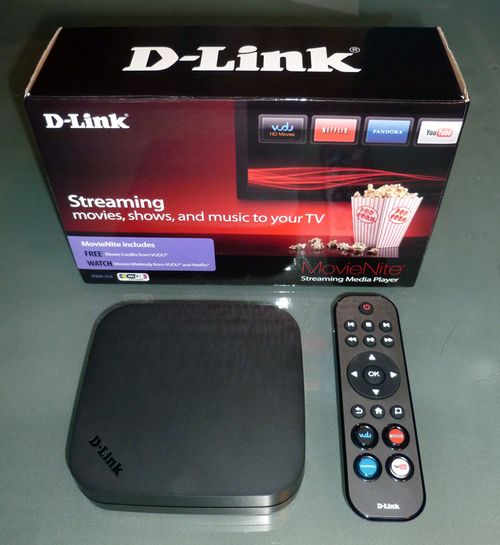
 Over the weekend I picked up the new D-Link MovieNite streaming media player, a $48 box developed in conjunction with Walmart and sold exclusively in their stores and via the Walmart.com website. Of all the streaming media devices I have reviewed and tested, I don't think I've ever told readers not to buy something, until today. For what is suppose to be a very simple player aimed at a non-techie crowd, this player falls far short in just about every category and is not worth the money.
The player supports 1080p video streaming and has 802.11n WiFi, 10/100 ethernet port, HDMI out and composite video connections. The player only supports content from Netflix, Vudu, YouTube and Pandora and has no support to play back local content via USB and no slot for any kind of memory card. While some of those shortcomings would be just fine for someone who only wants to use it to stream movies and TV shows from Netflix and Vudu, I'm afraid even those simple tasks are painful with this player.
The box supports 802.11n, yet no matter what I tried I could not get it to connect to my WiFi network. Another issue is that the name of WiFi networks are cut off, with my network only showing up as two letters in the name, out of seven. Putting in a call to D-Link's tech support number was no help as they couldn't solve the problem. My router sits ten feet from the box, has ten other devices that can connect to it via WiFi, yet the D-Link player kept telling me it could not connect to the network. D-Link support had me reset the box over and over again, with no luck. They then asked me to wait on hold for at least 30 minutes while they "called headquarters", but I declined to wait. On a side note, I know that most companies these days outsource tech support calls to foreign countries to save money, but trying to diagnose a tech issue, with someone who does not speak English fluently, is never a good user experience.
Hoping my WiFi issues were just a software problem that could be resolved with a firmware update, I tried to update the box under the maintenance option, but was given an error message of "Memory space is not enough for upgrade! Do you want to reboot now?" So if you can't download updates for the box, I'm not sure how D-Link expects to ever add fixes and features? For my last option, I actually broke out the printed three page Quick Install Guide in the box, but that was useless. But I did get a good laugh when step three told me not to plug in an ethernet cable if I wanted to use WiFi as the "on-screen setup wizard will allow you to configure your wireless settings". Now I get what they were saying, but if this box is really targeting non-techie's, step four should not be telling you to plug in the power supply when step three is talking about an on-screen setup wizard.
Giving up on trying to connect the box via WiFi I plugged in an ethernet cable which saw my network right away. Since the box only supports four content services, the remote has dedicated buttons for Netflix, Vudu, YouTube and Pandora. The bad news is that the software interface for this box is slow and buggy. Netflix takes nearly twenty seconds to load and videos take much longer to start up when compared with the Roku or WD TV Live player. D-Link does have a note on their website saying that they have released a product software update that resolves issues with streaming content from Netflix, but they don't say what issues they are fixing and there is no way to force download the update.
To get the update on the box D-Link says to "reboot it by powering it off and then back on, wait for the update message to appear, and select ok." Problem is I don't get that message when I reboot it and I have no way to know if that means I already have the update or not. The entire user-experience with this product was not well thought out and it's a really poor interface. I don't know why this box is so slow, but there is a lot of lag time with the software and the box froze on me twice, forcing me to pull the power plug.
Overall, there is nothing to like about this box and consumers would do far better spending $30 more for a Roku HD. And if 1080p isn't required, you can get a Roku LT for the same price as this box, which will also give you hundreds of content channels, instead of only four. The only advantage D-Link's MovieNite box has over Roku is their support for YouTube, something Roku is still missing for some unknown reason.
While I could understand D-Link and Walmart's desire to want to put out a really cheap streaming box in the market for those who just want to stream Netflix and Vudu, it's really pointless when every connected TV, Blu-ray player and streaming box already has Netflix on it. This box really doesn't fill any void in the market and isn't worth buying.

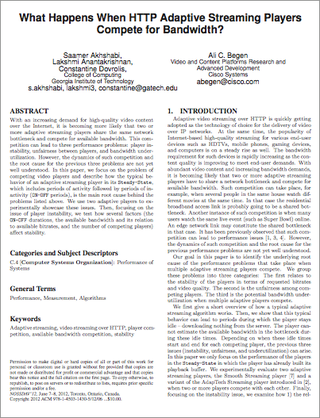 The College of Computing at Georgia Institute of Technology and the Video & Content Platforms Research and Advance Development Division at Cisco have published a white paper on HTTP adaptive streaming. The paper focuses on the problem of competing video players and describes how the typical behavior of an adaptive streaming player in its Steady-State, which includes periods of activity followed by periods of